
SUMIF دالة
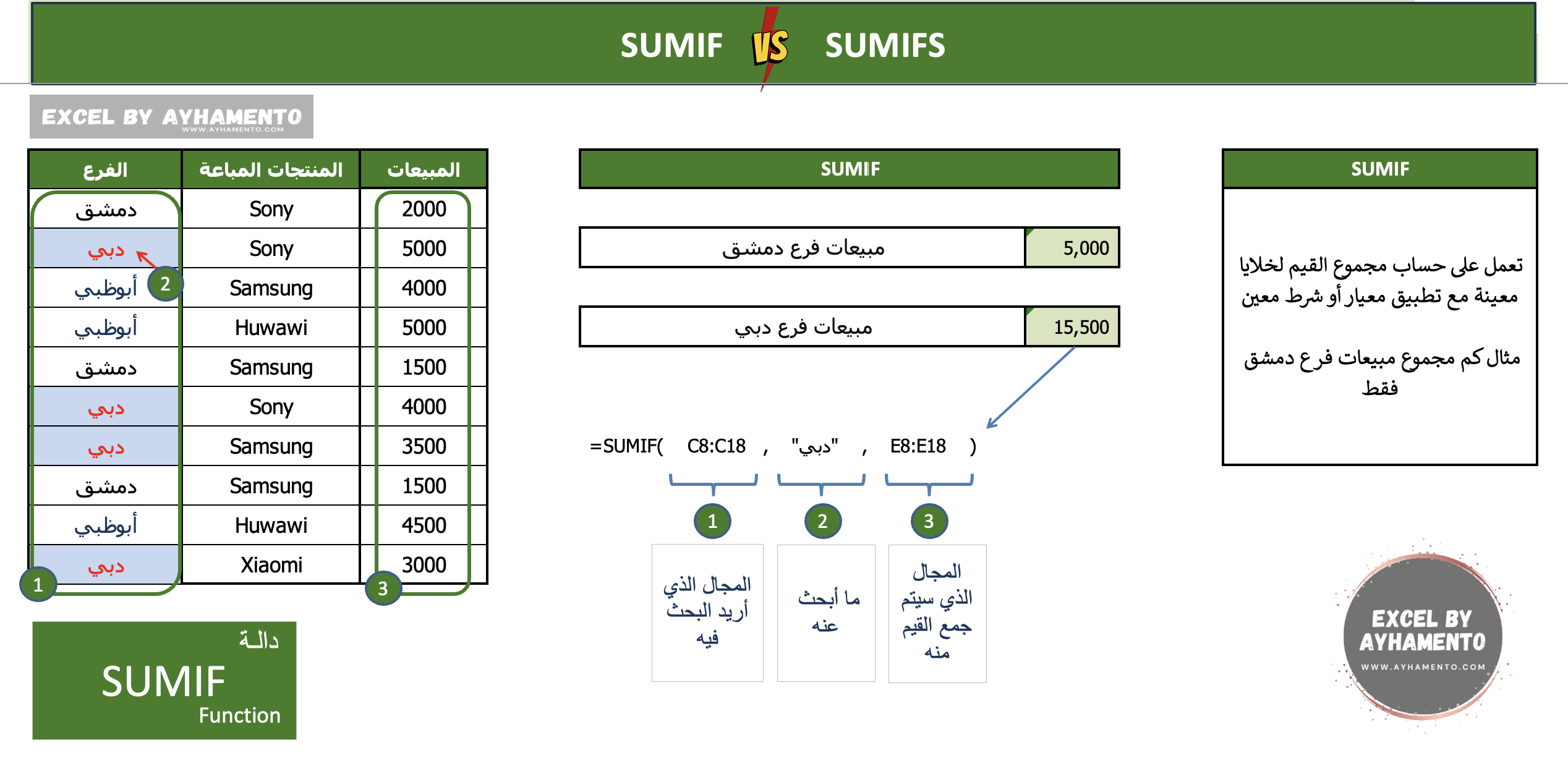
تعمل هذه الدالة على حساب مجموع القيم لخلايا معينة مع تطبيق معيار آو شرط معين
مثال ما هو مجموع مبيعات فرع دمشق فقط
ما هو مجموع مبيعات فرع دبي
في المثال المرفق لدينا قائمة بأسماء فروع الشركة وبجانب كل منها المنتجات المباعة داخل هذا الفرع والمبيعات
نود البحث في هذه البيانات عن مجموع مبيعات فرع معين، دبي على سبيل المثال
كل ما عليك فعله هو كتابة الدالة بالشكل التالي، وتحديد المجال الذي تود البحث فيه
=SUMIF(C8:C17,”دبي”,E8:E17)
حيث أن مجال البحث هو
العمود C
وما نريد البحث عنه هو “دبي”
طريقة عمل الدالة كالتالي:
بعد كتابة اسم الدالة، قم بتحديد المجال الذي تود البحث فيه
ثم قم بكتابة ما تبحث عنه، أو تحديد الخلية التي
تحتوي على الشيء الذي تود البحث عنه
ثم قم بتحديد المجال الذي سيتم جمع القيم منه.

SUMIFS دالة
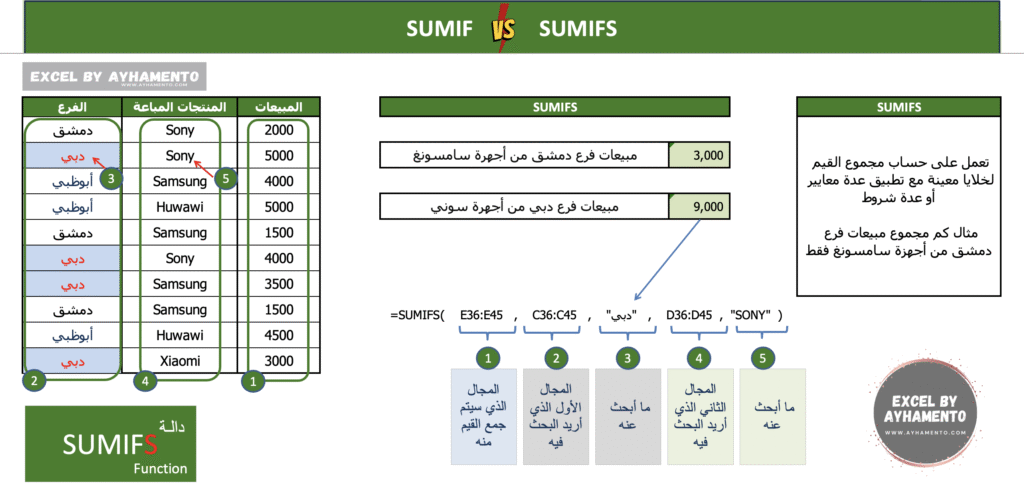
تعمل هذه الدالة على حساب مجموع القيم لخلايا معينة مع تطبيق عدة معايير أو عدة شروط
مثال ما هو مجموع مبيعات فرع دمشق من أجهزة سامسونغ فقط
أو ما هو مجموع مبيعات فرع دبي من أجهزة سوني فقط
في المثال المرفق لدينا قائمة بأسماء فروع الشركة وبجانب كل منها المنتجات المباعة داخل هذا الفرع والمبيعات
نود البحث في هذه البيانات عن مجموع مبيعات فرع دبي من أجهزة سوني فقط
كل ما عليك فعله هو كتابة الدالة بالشكل التالي، وتحديد المجالات الذي تود البحث فيها
=SUMIFS(E35:E44,C35:C44,”دبي”,D35:D44,”SONY”)
المجال
E
هو المجال الذي سيتم جمع القيم منه بعد تطبيق الشروط أدناه
المجال
C
هو المجال الأول الذي نريد البحث فيه
معيار البحث هو “دبي”
المجال
D
هو المجال الثاني الذي نريد البحث فيه
معيار البحث هنا هو
“Sony”
طريقة عمل الدالة كالتالي:
بعد كتابة اسم الدالة، قم بتحديد المجال الذي سيتم جمع القيم منه،
ثم قم بتحديد المجال الأول الذي تريد البحث فيه
ثم قم بكتابة ما تبحث عنه
“دبي”
بعد ذلك قم بتحديد المجال الثاني الذي تريد البحث فيه
ثم قم بكتابة ما تبحث عنه
“Sony”

SUMIF
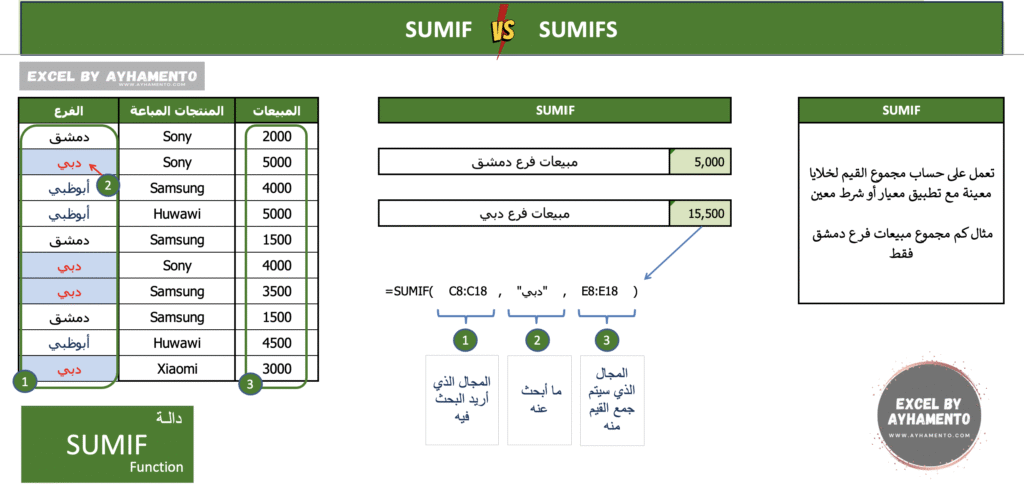
This function is used to calculates the values in a range, based on a certain condition or criterion.
Example 1:
What is the total sales for Damascus branch
Example 2:
What is the total sales for Dubai branch
In this example, we have a list of the company’s branches, with the products sold in each branch shown next to them, and the sales.
We want to search through this data to find the total sales of a specific branch، Dubai for instance.
All you need to do is to write the function as follows, specifying the range you want to search in:
=SUMIF(C8:C17, “دبي”, E8:E17)
Where:
The search range is column C
The condition or criterion we’re looking for is “دبي” (Dubai)
How it works:
After writing the function name, first select the range where you want to search (e.g., the column that contains the branch names).
Then, type in the condition (What you are looking for), or select the cell that contains the value you want to search for.
Finally, specify the range from which the values will be calculated.

SUMIFS
This function is used to calculates the values in a range based on multiple conditions or criteria.
Example 1:
What is the total sales of Samsung products in Damascus branch only
Example 2:
What is the total sales of Sony products in Dubai branch only
In this example, we have a list of the company’s branches, the products sold in each branch, and the corresponding sales figures.
We want to search through this data to find the total sales of Sony products in Dubai branch only.
All you need to do is to write the function as follows:
=SUMIFS(E35:E44, C35:C44, “دبي”, D35:D44, “SONY”)
Where
E35:E44: is the range from which the values will be calculated, after applying the conditions below.
C35:C44: is the first range you want to search in (Branches).
The condition being applied here is: “دبي” (Dubai)
D35:D44: is the second range you want to search in (products).
The condition here is: “SONY”
How it works:
After typing the function name (SUMIFS), start by selecting the range that contains the values to be calculated.
Then, specify the first range you want to search in (e.g., the column with branch names).
Enter the text that you are searching for , “Dubai”.
Next, specify the second range to search in (e.g., the column with product names).
Finally, Enter the text that you are searching for, “Sony”.