دالة
Vlookup
تستخدم هذه الدالة للبحث عن المعلومات ذات الصلة من خلال الخلايا المتشابهة بين عدة جداول/ ملفات (أي بشرط أن تكون نفس الخلية موجودة بالملف الأول والثاني).
أي أنه إذا كانت لدينا نفس الخلية موجودة في جدولين (مثلاً اسم الموظف) عندها يمكننا البحث عن بيانات مرتبطة باسم هذا الموظف موجودة في الملف الأول من خلال البحث عن اسم هذا الموظف في الملف الآخر.
V
اختصار لكلمة
Vertical
أي البحث بشكل أفقي (نفس الصف)
VLOOKUP تحتوي
على الوسائط التالية:
Lookup Value
القيمة التي سيتم البحث عنها في العمود الأول من الجدول أو النطاق.
Table Array
نطاق الخلايا (الجدول) الذي يحتوي على البيانات التي نود البحث فيها عن القيمة المطلوبة.
Col-Index-Num
تسلسل العمود الي يحتوي على البيانات التي نود نقلها إلى الملف الأصلي..
يتم العد ابتداءً من نطاق الخلايا الذي تم تحديده مسبقاً…
Range Lookup
اختيار البحث عن القيم بشكل تام أو تقريبي…
(للمبتدئين: ضع صفر)
____________________________________
يراعى عند استخدامها الجوانب التالية:
يجب ان تكون القيم (البيانات المتشابهة) تحتوي على نفس التنسيق
(General , Number , Text …..etc)
–
تسلسل العمود
Col-Index-Num
هو رقم العمود الذي يحتوي على المعلومات التي نود نقلها ابتداءً من العمود الأول الذي تم تحديده في النطاق/الجدول
Table Array
وليس بالضرورة ابتداءً من العمود الأول في صفحات الإكسل .
…
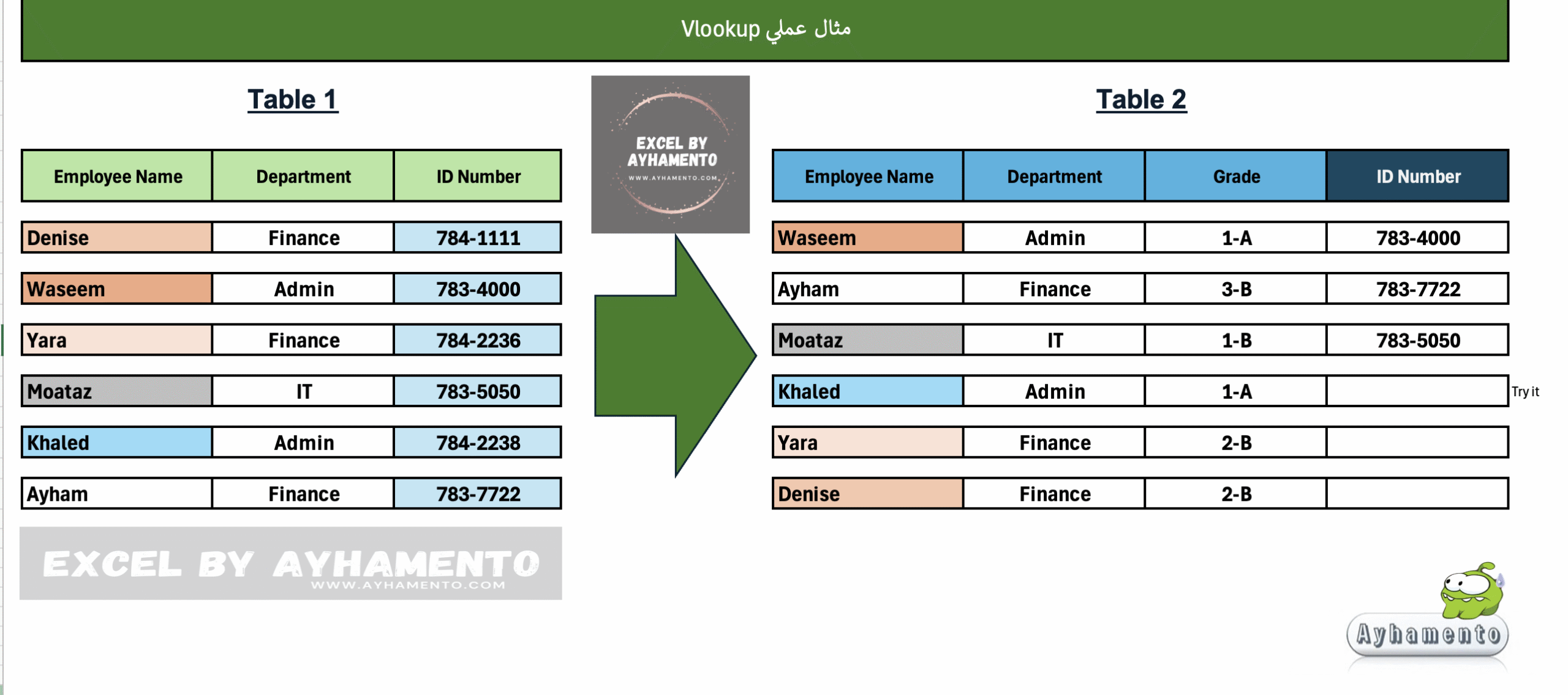
المثال المرفق:
لدينا جدولين بصفحتين مختلفتين , الجدول الأول يتضمن أسماء الموظفين وأقسامهم وأرقام هوية كل منهم, الجدول الثاني يحتوي على أسماء الموظفين بترتيب مختلف
نود ومن خلال البحث عن الأسماء المتشابهة بين الجدولين نقل أرقام الهوية من الملف الثاني إلى الملف الأول مع مراعاة أن الأسماء ليست بنفس الترتيب

Vlookup
This formula is used to find information in a table by matching cells across multiple tables or files from one row on the condition that the same value (such as a name or ID) exists in both tables.
For example, if we have the same value (e.g., employee name) in two different tables, we can use this function to retrieve data associated with that employee from one table by matching their name in the other.
The V in VLOOKUP stands for Vertical Lookup, which means the function searches vertically to find a match, and then returns a value from the same row.
=VLOOKUP(lookup_value, table_array, col_index_num, [range_lookup])
Lookup Value
The value you are searching for (this must be located in the first column of the selected table or range.
Table Array
The range of cells (or the table) that contains the data you want to search through. (the lookup value must be located in the first column of the selected table or range.)
Col Index Num
The column number (starting from the first column in the selected range) that contains the data you want to retrieve.
Range Lookup
Indicates whether you want an exact match (FALSE or 0) or an approximate match (TRUE or 1).
(For beginners, it is recommended to use 0 for an exact match.)
Example:
We have two tables on two separate sheets.
- The first table contains employee names, departments, and ID numbers.
- The second table contains employee names, but in a different order.
We need to find the ID numbers from the second table and transfer it into the first, based on matching employee names, even though the order of names is different in each table.
Important Notes:
- Ensure that the matching values (e.g., employee names) have the same data format in both tables
(e.g., General, Number, Text, etc.), otherwise the match may not work. - The column index number refers to the position of the column within the selected table array, not necessarily the column number on the Excel sheet. For example, if you select columns B to D, then column B is 1, C is 2, and D is 3.

قم بتحميل الملف والتجربة بنفسك
Download the excel sheet and practice it yourself: VLOOKUP