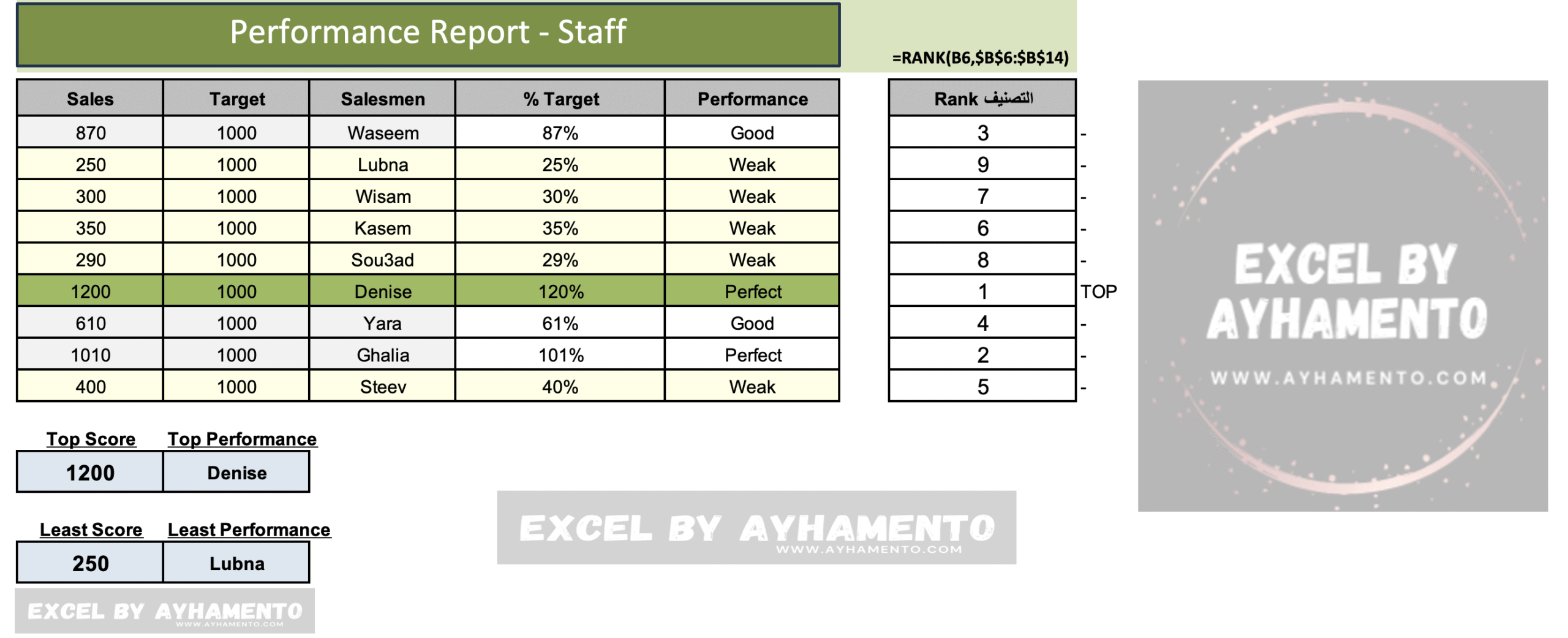
RANK دالة
تعمل هذه الدالة على تحديد مرتبة قيمة معينة مقارنةً بباقي القيم (المرتبة الأولى ، المرتبة الثانية وهكذا)
مثال ما هو ترتيب مبيعات موظفٍ ما مقارنة بجدول المبيعات لجميع الموظفين.
في المثال المرفق لدينا جدول للمبيعات ويتضمن أسماء موظفي المبيعات، ونود معرفة ترتيب كل موظف من حيث المبيعات مقارنة بمبيعات باقي الموظفين بالجدول.
كل ما عليك فعله هو كتابة الدالة بالشكل التالي
:
=RANK(B7,B7:B15)
طريقة عمل الدالة كالتالي:
بعد كتابة اسم الدالة، قم بتحديد القيمة التي نود معرفة ترتيبها
B7
ثم قم بتحديد مرجع قائمة الأرقام الذي نود معرفة ترتيب القيمة أعلاه منها
B7:B15

RANK
This function is used to determines the rank of a specific value compared to other values (First,Second…etc)
Example:
What is this salesman’ position in the sales ranking, comparing to the overall sales for all salesmen?
In this example, we have a sales table that includes the names of salesmen. We want to find out each salesman’s rank in terms of sales compared to the rest of the salesmen in the table.
All you need to do is to write the function as follows:
=RANK(B7, B7:B15)
How it works:
After writing the function name (Rank), specify the value you want to rank:
B7
Then, specify the reference range of numbers you want to compare that value against:
B7:B15
قم بتحميل الملف والتجربة بنفسك
Download the excel sheet and practice it yourself: RANK